
Rotating Your Music With the Calendar, One Season at a Time
Category : Music
Rotating Your Music With the Calendar, One Season at a Time
There comes a moment, usually mid-October or the first warm Saturday in March, when the playlist you have leaned on for weeks suddenly feels wrong. The songs are the same, but the light is different, and the music no longer fits the weather. That small mismatch is worth listening to. Rotating what you play as the year turns is one of the simplest ways to keep your library feeling alive, and mp3juices.art makes the habit easy by turning a vague mood into a searchable set of songs you can preview, save and download.
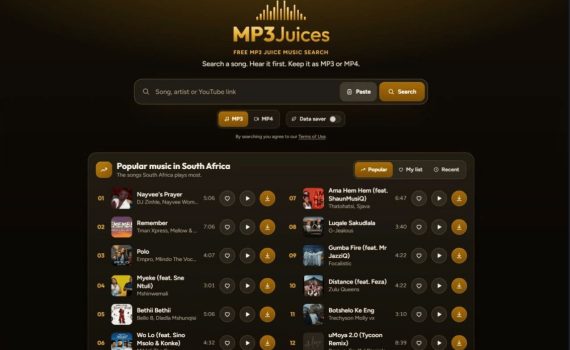
MP3Juices is a free web-based music search tool. You type in a song, artist or genre, listen to a preview, and download what you like as an MP3 or MP4 file, with no account and nothing to install. That low friction is exactly what a seasonal rotation needs: you are not committing to a subscription or rebuilding a library, you are just chasing a feeling and keeping the tracks that match it.
Why Seasonal Listening Deserves Its Own Playlists
Most people build one giant playlist and let it grow until it becomes a wall of songs they skip past. Seasonal rotation works the other way around. Instead of one list that has to do everything, you keep a handful of smaller lists tied to a time of year or a mood, and you swap them in and out as the calendar moves.
The benefit is not just variety. A short, focused list makes it easier to notice new additions and easier to retire songs that have gone stale. Rotation is a habit, not a one-time cleanup, and the listeners who enjoy it most treat it like changing the sheets or swapping the wardrobe: a small seasonal ritual rather than a big project.
MP3Juices fits this because it is built around discovery rather than ownership of a fixed catalog. You can browse by genre, browse by artist, check charts, and keep a personal list of what you find. That personal list is the seed of a rotation: each season becomes a small collection you can return to next year and compare against the last.
Spring: Fresh Starts and Light, Bright Searching
Spring listening tends to be about movement. People walk more, open windows, and reach for music that feels like it is going somewhere. The temptation is to grab the obvious upbeat hits, but a better approach is to search by mood first and artist second.
Start with genre browsing, then narrow
Use the genre browsing on MP3Juices to pick a broad lane — pop, indie, electronic, whatever matches the season for you — and preview a handful of tracks before committing. The listen-before-you-download step matters here, because spring playlists go wrong when they are all energy and no texture.
Keep the list short and skippable
A spring list of fifteen to twenty songs is plenty. Add a few familiar tracks as anchors and let the rest be new. When you find something through the charts or an artist page, download the MP3 and drop it into the list the same day, while the association is still fresh.
The MP4 option is useful in spring too, since it is the season when people start sharing clips and visuals again. Downloading a video version of a song you already like gives you a second way to enjoy it without hunting for it later.
Summer: Volume, Energy and the Charts
Summer is the loudest season, and it is also the one where playlists are most likely to be shared with other people. That changes the job of the list. It is no longer just for you; it has to survive a car ride, a garden, a gathering.
This is where the charts on mp3juices.art earn their place. Charts give you a quick read on what is currently moving, which is useful when you need a list that other people will recognize. Use them as a starting point rather than the whole list, then balance the well-known tracks with a few personal finds so the playlist still sounds like yours.
Build for background and foreground
Split the summer rotation into two lists: one for background listening where the songs should blend, and one for the tracks you actually want people to notice. The background list can be longer and looser; the foreground list should be short and deliberate.
Use data saver mode when you are out
Summer listening often happens away from Wi-Fi. The data saver mode on the site is a practical detail here: it lets you browse and preview without burning through a mobile plan, so you can decide what is worth downloading before you commit to the file size.
Downloading the MP3s ahead of time is the other half of the strategy. A summer list that only exists as streaming links will fail the moment the signal drops, which is exactly when you want it most.
Autumn: Nostalgia, Artists and Deeper Cuts
Autumn is the season when listeners go back. Back to old favorites, back to full albums, back to the artists they loved before the current charts existed. This is less about finding new hits and more about re-reading a catalog you already half know.
Artist browsing is the right tool for this mood. Pick three or four artists who defined a period of your life, open their pages, and work through tracks you skipped the first time. Previewing makes this cheap: you can audition a deep cut in seconds and only download the ones that still land.
The autumn list is where the personal list feature proves its worth. Because you can keep a list of what you find, you can build the rotation gradually over weeks instead of trying to assemble it in one sitting. Add a track when it moves you, and by the end of the season the list has assembled itself.
Autumn is also a good time to prune. Go through last year’s autumn list, keep the songs that still work, and retire the ones that were only ever about a moment. A rotation that never sheds anything is just accumulation.
Winter: Comfort, Quiet and the Long Listen
Winter listening is slower. People reach for warmth, for voices, for songs that reward attention rather than energy. The playlists get longer and quieter, and the listening happens indoors, often with headphones and no deadline.
This is the season for the listen-first habit. When the mood is specific and hard to name, previewing is how you find the track that matches it. Search by genre, audition a few candidates, and keep only the ones that fit the room you are actually in.
Winter is also the best time to revisit the whole year. Open the spring, summer and autumn lists side by side and notice what carried over. The songs that appear in more than one season are usually the ones worth keeping permanently; the rest can stay in their own seasonal folders until the calendar comes around again.
Because MP3Juices requires no account, this year-end review is simple. Everything you downloaded is already yours to organize however you like, whether that is folders by season, by mood, or by the year you first heard the song.
Keeping Your Rotations From Piling Up
The failure mode of seasonal playlists is clutter. Four seasons times several moods times a few years adds up fast, and a library that is too large becomes the same wall of skipped songs you were trying to escape.
Set a simple rule and stick to it. One list per season, capped at a length you will actually play, with a short carry-over list for the songs that survive the year. When a new season starts, archive the old list rather than deleting it, and let the personal list on mp3juices.art hold the candidates you are still deciding on.
That is the whole method: search, preview, download only what fits the moment, and rotate on schedule. The calendar does most of the work. The site just makes it easy to keep up.